

FEATURES & BENEFITS
- Transfer up to 244 bytes of data in both directions
- Convert standard and proprietary RS-232/485 protocols
- Web-based drag and drop configuration interface
- -25 to +70 °C industrial temperature range
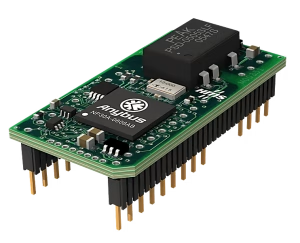
- Powered by award winning NP40 network processor
Transfer up to 244 bytes of data
Demand for more data is constantly growing and the Communicator has been equipped to handle the challenge. It can transfer 244 bytes from the PLC to the Gateway and 244 bytes from the gateway to the PLC, 488 bytes in total. Support for up to 150 Modbus commands means even complex configurations with multiple nodes can be handled with ease.
Drag and drop web interface
To make sure you spend as little time as possible configuring the Communicator, we have built a graphical and responsive web-based user interface. No software needed to be installed, just open your favorite web browser and get started.
Industrial temperature range
An industrial operating temperature range of -25 to +70 °C ensures the Communicator can excel under harsh conditions.
Powered by proven NP40 technology
The Communicator is built on the award-winning and proven Anybus NP40 network processor. With hundreds of thousands NP40:s used in Embedded applications across the world, it is the industry benchmark for reliable industrial communication.
Security switch
Even with sophisticated security measures, human error is still the main cause of security breaches. To simplify security, we added a physical security switch on the Communicator. It locks your configuration and prevents any access to the web-based configuration interface. Just flip it when your configuration is done and watch the padlock LED on the product light up.
Ethernet configuration port
With a dedicated Ethernet configuration port you don’t need any special configuration cable. In addition, it is easy to connect to the gateway to monitor network traffic.
Optimized for DIN-rail mounting
The slim form factor, front facing network connectors, screw in serial cable connector and the neat cable tie ensure it is fast and simple to install and connect the Communicator.
Diagnostics
When opening the Communicator web interface you immediately see the status of the PROFINET connection and serial connection. You can even see the status of individual serial nodes. It’s also equipped with a serial log and an event log for further analysis.
Support
Sometimes you run into a problem where you need help. That’s why we have included a support page in the user interface with contact information. There is even a button to generate a support package to simplify troubleshooting.
| Files | Version | Size | Read online | Download | |||
|---|---|---|---|---|---|---|---|
AUTRES FICHIERS | |||||||
| Anybus Communicator PROFIBUS CAD Files and Drawings | 5 NOV, 2021 | 18,79 MB | Download | ||||
BROCHURE/DATASHEET | |||||||
| Anybus Communicator Serial to PLC Datasheet | 1.0 | 421,19 KB | Download | ||||
CERTIFICATIONS | |||||||
| CE Declaration of Conformity | NOV 9, 2022 | 693,75 KB | Download | ||||
| KC Certification 등록필증 | NOV 15, 2022 | 424,89 KB | Download | ||||
| UK Declaration of Conformity | OCT 21, 2022 | 318,34 KB | Download | ||||
| UL Certificate of Compliance | NOV 9, 2022 | 204,97 KB | Download | ||||
FICHIERS DE CONFIGURATION | |||||||
| GSD File for PROFIBUS | 2,30 KB | Download | |||||
LOGICIEL | |||||||
| HMS IPconfig – Utility for module TCP/IP configuration | 4.3.0.0 | 3,12 MB | Download | ||||
MODE D’EMPLOI/MANUEL DE CONCEPTION | |||||||
| Replacing Communicator Classic with New Communicator | 1.1 | 1,58 MB | Download | ||||
| Safety and Compliance Information – Anybus Communicator | 1.11 | 749,16 KB | Download | ||||
| Startup Guide – Anybus Communicator PROFIBUS | 1.21 | 2,94 MB | Download | ||||
| User Manual – Anybus Communicator PROFIBUS | 1.23 | 9,79 MB | Download | ||||
| User Manual | 1.1 | 519,61 KB | Download | ||||
VIDEOS | |||||||
| How To – Connect a Serial Device to EtherNet/IP (or other Protocol) | 15,63 MB | Download | |||||
| How To – Custom Query Response Protocol | 48,07 MB | Download | |||||
| How To – Setup a Custom Produce/Consume Protocol | 60,98 MB | Download | |||||
| How To – Setup a PROFIBUS DP Connection in TIA Portal | 59,35 MB | Download | |||||
| How To – Update Firmware | 9,53 MB | Download | |||||



Reviews (%d)
Er zijn nog geen beoordelingen.